

These are instructions on removing or uninstalling Realme Driver from a Windows computer (Windows 7, 8, 8.1, 10, and 11).
Note: The following method will help you remove or uninstall the Realme Driver from a Windows computer. If you have manually installed the Realme Driver through the device manager, uninstall it from Device Manager instead.
Steps to Remove or Uninstall Realme Driver
- Open Programs and Features window on the computer. To Open Programs and Features window: Press
Windows+Rkey and typeappwiz.cpland click on the OK button.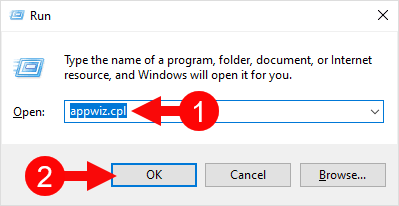
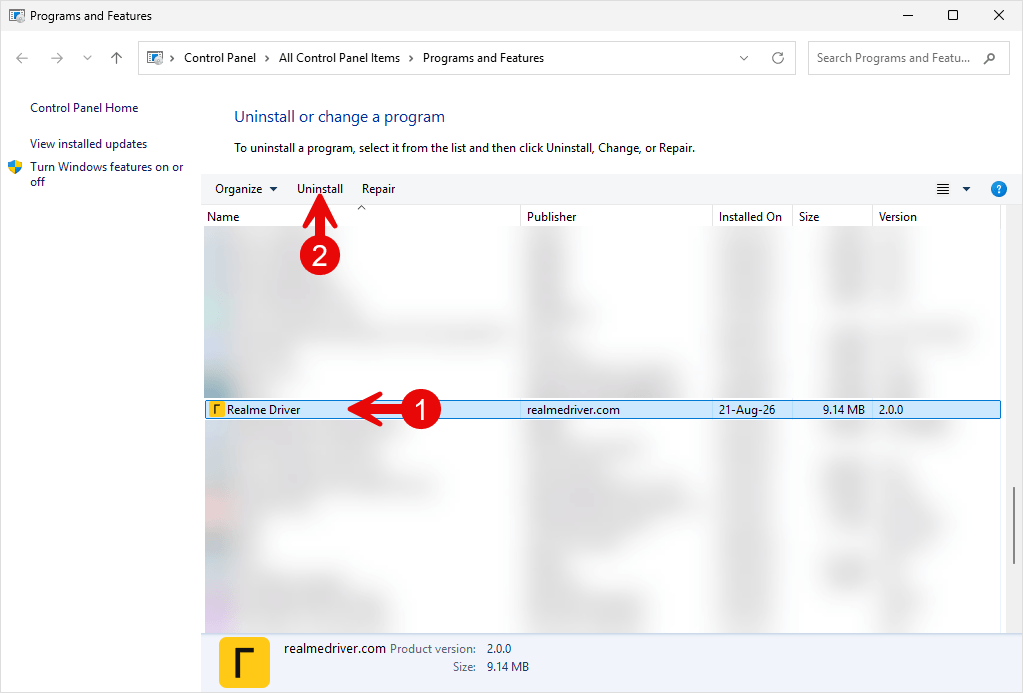
- Under Programs and Features window, Locate the Realme Driver from the List and Click on the Uninstall button to Start the Removal process.
- Now, Realme Driver will be uninstalled from the Computer. This process may take a few seconds to complete.
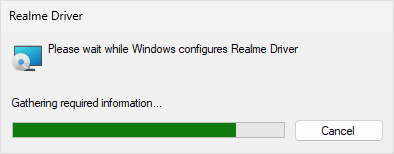
- Realme Driver is now removed from the computer.
Congratulations! Now restart the computer so Windows can finish applying the driver removal.
Notes:
[*] Download Realme Driver: You can download the latest Realme Driver from our Download Section.
[*] Realme Driver for Specific Model: If you are looking for the Realme Driver for any specific model, then head over to our Devices page.
[*] Realme Firmware: If you are looking for the official Realme Stock Firmware, then head over to the Realme Firmware page.
[*] Install Realme Driver: If you want to learn how to install the Realme Driver, then head over to How to install Realme Driver page.
